




Gemini公仔生成圖片在全球爆紅,Google推出的全新「Nano Banana模型指令」能讓民眾用照片產出超逼真的3D模型公仔。不過,近期就有日本網友拿著自己坐著釣魚的帥氣照片生成,成品卻超害羞,AI直接幫他生出「巨大的第3條腿」,害羞畫面瞬間在全球瘋傳。
Gemini太貼心了!他坐著釣魚「成品公仔超害羞」
日本網友@tsurinomad昨(9)日在社群平台X上分享,「嘗試用流行的AI濾鏡時,結果發生了意外」,隨後曬出自己的AI公仔成品,tsurinomad是用自己釣起魚面露笑容的照片,當時他本人是在船上坐著小凳子,轉身過來面對鏡頭,因此右腳只有一半被拍到畫面中。
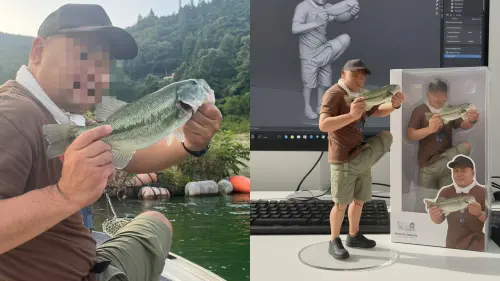
▲日本網友拿著自己坐著釣魚的帥氣照片生成,成品卻大翻車,AI直接幫他生出「巨大的第3條腿」。(圖/X@tsurinomad)
沒想到,Gemini開始生成之後,卻誤會了tsurinomad右腳是「長在胯下」的部位,隨後還幫忙生成了新的雙腳,導致tsurinomad變成一個「有著巨大第三條腿的釣魚客」,就這樣,一幅傳奇作品就這樣誕生了。
成品曝光後,立刻爆紅吸引超過13萬人按讚,全球網友笑翻大讚:「AI太懂男人想要什麼了」、「這就是黃仁勳想看到的世界嗎」、「大得太離譜了啦」、「這是旋風噴射阿姆斯壯加農炮」、「看到畫面直接笑出來,可以去申請金氏世界紀錄了」。

▲Gemini生成時,誤會tsurinomad右腳是「長在胯下」的部位。(圖/X@tsurinomad)
想生成自己公仔的作品嗎?步驟流程一次看
看完上面日本網友tsurinomad有趣的經歷之後,你是否也想製作出自己獨特的AI公仔呢?事實上,日前Google正式宣布,免費使用Gemini的生成圖片額度,每天為最多100張,因此一般人都可以暢快遊玩,完整步驟如下:
直接進入Gemini(網址直接點),下方按「+」上傳照片,選擇「圖像」按鈕並輸入下方指令,系統即會自動生成。
Gemini公仔超逼真模型免費生成指令,上傳圖片後下方全文貼入對話框:
A hyper-realistic 1/7 scale figurine of a character, designed as a finished commercial product, placed on an iMac computer desk with a white Apple keyboard. The figurine stands on a clean, round transparent acrylic base with no labels or text. Professional studio lighting highlights the sculpted details. On the iMac screen in the background, display the ongoing ZBrush modeling process of the same figurine, showing the contrast between "work in progress" and the finished product. Next to the figurine, place its packaging box with rounded corners and a transparent front window. The box is open at the top, revealing only the inner transparent plastic clamshell, and its height is slightly taller than the figure, realistically sized to contain it.
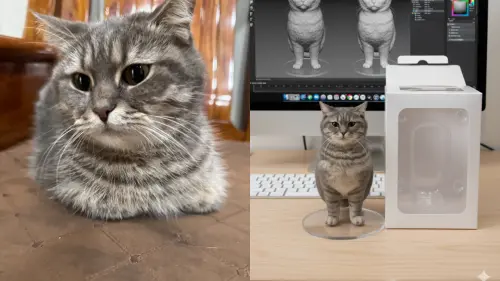
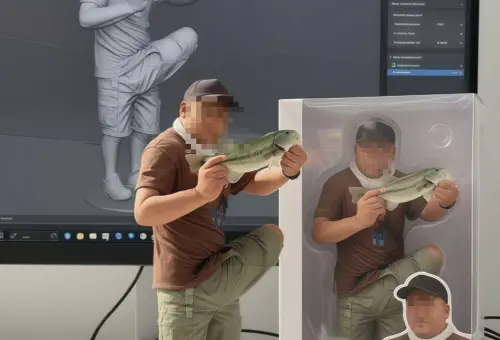
▲《NOWNEWS》記者實際測試,發現Gemini真的很喜歡幫忙生成出完整的軀幹。(圖/記者潘毅AI製圖)
中文指令部分,則可以輸入以下全文:
以寫實風格,在真實環境中,創作1/6比例的商品化相片的中的人物模型。模型放置在電腦桌上。模型底座為圓形透明壓克力,底座上沒有文字。電腦螢幕上顯示的內容是該模型的ZBrush建模過程。電腦螢幕旁邊是一個印有原圖的BANDAl風格玩具包裝盒。包裝盒採用二維平面插畫設計。
透過上述操作步驟之後就能產出你專屬的AI公仔囉!
Gemini公仔相關報導一次看
Gemini公仔台灣人玩瘋了!Google曝用量限制 免費圖片生成量超佛
Gemini公仔爆紅!官方揭一週成績單:逾2億張圖片、增1000萬用戶
Gemini公仔超逼真爆紅!ChatGPT慘輸 生成步驟、免費指令一次看
我是廣告 請繼續往下閱讀
日本網友@tsurinomad昨(9)日在社群平台X上分享,「嘗試用流行的AI濾鏡時,結果發生了意外」,隨後曬出自己的AI公仔成品,tsurinomad是用自己釣起魚面露笑容的照片,當時他本人是在船上坐著小凳子,轉身過來面對鏡頭,因此右腳只有一半被拍到畫面中。
成品曝光後,立刻爆紅吸引超過13萬人按讚,全球網友笑翻大讚:「AI太懂男人想要什麼了」、「這就是黃仁勳想看到的世界嗎」、「大得太離譜了啦」、「這是旋風噴射阿姆斯壯加農炮」、「看到畫面直接笑出來,可以去申請金氏世界紀錄了」。
看完上面日本網友tsurinomad有趣的經歷之後,你是否也想製作出自己獨特的AI公仔呢?事實上,日前Google正式宣布,免費使用Gemini的生成圖片額度,每天為最多100張,因此一般人都可以暢快遊玩,完整步驟如下:
直接進入Gemini(網址直接點),下方按「+」上傳照片,選擇「圖像」按鈕並輸入下方指令,系統即會自動生成。
Gemini公仔超逼真模型免費生成指令,上傳圖片後下方全文貼入對話框:
A hyper-realistic 1/7 scale figurine of a character, designed as a finished commercial product, placed on an iMac computer desk with a white Apple keyboard. The figurine stands on a clean, round transparent acrylic base with no labels or text. Professional studio lighting highlights the sculpted details. On the iMac screen in the background, display the ongoing ZBrush modeling process of the same figurine, showing the contrast between "work in progress" and the finished product. Next to the figurine, place its packaging box with rounded corners and a transparent front window. The box is open at the top, revealing only the inner transparent plastic clamshell, and its height is slightly taller than the figure, realistically sized to contain it.
以寫實風格,在真實環境中,創作1/6比例的商品化相片的中的人物模型。模型放置在電腦桌上。模型底座為圓形透明壓克力,底座上沒有文字。電腦螢幕上顯示的內容是該模型的ZBrush建模過程。電腦螢幕旁邊是一個印有原圖的BANDAl風格玩具包裝盒。包裝盒採用二維平面插畫設計。
透過上述操作步驟之後就能產出你專屬的AI公仔囉!
Gemini公仔相關報導一次看
Gemini公仔台灣人玩瘋了!Google曝用量限制 免費圖片生成量超佛
Gemini公仔爆紅!官方揭一週成績單:逾2億張圖片、增1000萬用戶
Gemini公仔超逼真爆紅!ChatGPT慘輸 生成步驟、免費指令一次看